 HYP-1
HYP-1Manual
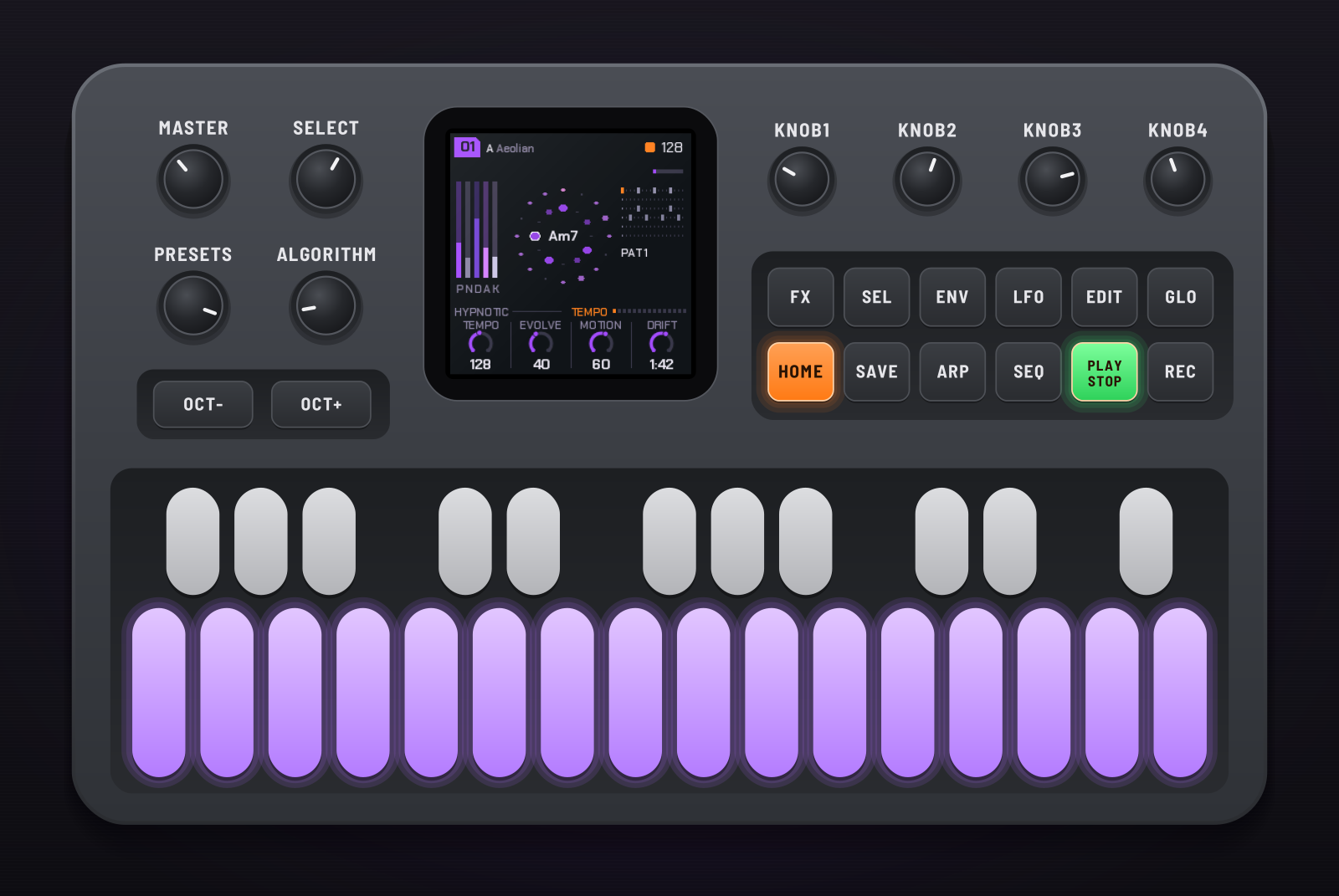
HYP-1 turns the M-VAVE FM-1 into a hypnotic techno and acid machine. It plays from the moment it's switched on: a breathing pad, a deep drone, a generative 303 line and a bed of grain, over drums you sequence. You shape the voices like a small modular, flip patterns on the bar, break it down and build it back up, and record the whole performance into your DAW. A printable version of this manual, with every control numbered and every screen lettered, is the PDF manual.
This manual is for HYP-1 version 1.0.24. To hear it first, watch five minutes played live, or more on YouTube. Ideas and questions go on the board.
1Install
Try it first: the HYP-1 emulator runs the same code in the browser, with sound, played with the mouse, a touch screen or the keyboard.
Install: open the web installer in Chrome or Edge, connect the FM-1 with a USB data cable, close anything else using its MIDI port (a DAW, for instance) and press Install. Don't unplug it while it's writing; when it finishes, the FM-1 restarts into HYP-1.
Go back: "Back to the stock firmware", at the bottom of the same page, puts M-VAVE's firmware back. M-VAVE's own updater, M-UPGRADE, works too.
Installing firmware is at your own risk. If an install is cut off, run it again: the FM-1 stays in update mode until it finishes. Holding OCT− and OCT+ for 5 seconds also enters update mode.
2Getting started
- Switch it on. The RedtailWorks card (a pixel red panda on the name) shows, then HYP-1 with sixteen steps filling in, then a piece starts playing at random. Press any button or key to skip straight to the music.
- Turn SELECT to walk through the pages; the four knobs under the screen change what each page shows.
- Press SEQ for the drums, hold it for the step sequencer, and tap the white keys to change the beat.
- Turn PRESETS for another piece. Hold SEL and turn ALGORITHM to hear it as house, techno, acid or breakcore.
- Tap SAVE for a breakdown on the next bar; tap it again for a four-bar build and the drop.
- Press FX and hold keys for effects.
- Like a piece? Go to Global (GLO) and press SAVE to store it.
3Controls
| # | Control | What it does |
|---|---|---|
| 1 | MASTER | Volume. |
| 2 | SELECT | Steps through the pages in order. With HOME held: the tempo, from any page. |
| 3 | PRESETS | The piece, 01–10. With SEL held: the piece changes on the next bar. |
| 4 | ALGORITHM | The mode of the scale. With SEL held: the piece's style. |
| 5–8 | KNOB 1–4 | The four values (a, b, c, d) of the page on screen. |
| 10 | OCT− | An octave down (to −3): on a voice's pages, that voice (pad, drone, acid); on any other page, the whole song. In the sequencer: the previous drum. |
| 11 | OCT+ | An octave up (to +3), the same way. In the sequencer: the next drum. |
| 12 | FX | The effects menu, on and off. |
| 13 | SEL | Shift, held (see 11. Shift). |
| 14 | ENV | Pad; press again for Pad env, again for Pad LFO. |
| 15 | LFO | Drone; again for Drone env, again for Drone LFO. |
| 16 | EDIT | The next chord, on the next bar. |
| 17 | GLO | Global: root, theme, tune, MIDI out. Here SAVE stores the piece. With SEL held: remote (see 13). |
| 18 | HOME | The Tempo page. Hold it and turn SELECT for the tempo. |
| 19 | SAVE | Breakdown on the next bar; again, a build and the drop; held, the drop. On Global: store the piece. In FX, held: lock mode. |
| 20 | ARP | Acid; again for Acid env, again for Acid line. |
| 21 | SEQ | Drums; again, Links; held, the sequencer; tapped in the sequencer, back to Drums. With SEL held: the links on and off. |
| 22 | PLAY | Play and stop. |
| 23 | REC | Freeze: the chord holds until pressed again. |
| 24 | White keys | The scale (each key adds or removes its note; the root stays). Sequencer: the 16 steps. FX: effects. |
| 25 | Black keys | The scale. FX: effects. |
Hold any button alone for a second and a card on the screen says what it does (except PLAY, SEL, SAVE, SEQ and FX, whose hold means something else).
4The screen
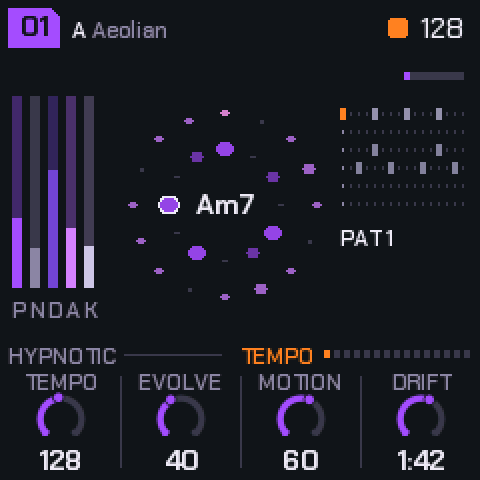
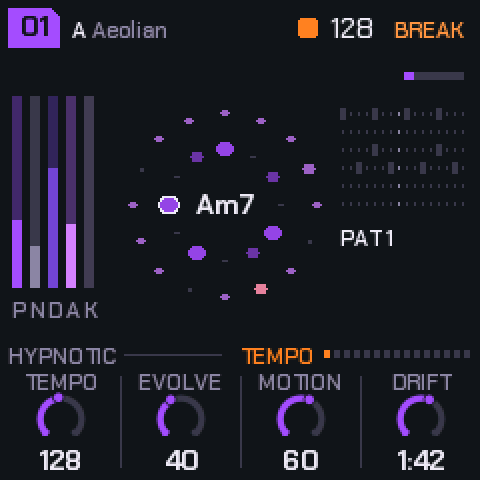
- Top left: the piece's number in a tag (a dot in it: changes not yet stored), the root and the mode.
- Top right: the beat light and the tempo; the section (BREAK, BUILD, blinking while it waits for the bar); a small dot while a store waits to be written.
- Left: the levels of the pad (P), noise (N), drone (D), acid (A) and the kit (K).
- Middle: the scale as a ring with the chord in it; around it, the acid loop, one dot a step.
- Right: the drum pattern playing, its number, and a bar filling towards the next chord.
- The line above the knobs: the piece's style on the left; on the right, the page's name and a dot for each page.
- Bottom: the four knobs: each value's name, its ring and its value.
5The pages
SELECT walks through them in this order. The buttons jump straight to a voice, and pressing the same button again steps through that voice's envelope and LFO. KNOB 1 is always a voice's level.
| Page | Reach it | a | b | c | d |
|---|---|---|---|---|---|
| Tempo | HOME | Tempo (70–190) | Evolve | Motion | Drift (20 s – 5 min a chord) |
| Pad | ENV | Level | Bright | Colour (Rhodes / Voices) | Detune |
| Pad env | ENV ×2 | Attack | Hold | Release | Rest |
| Pad LFO | ENV ×3 | Rate (a 1/4 note – 32 bars) | Depth | Shape (sine, triangle, saw, square, S&H, drift) | Target (filter, level, pan, pitch) |
| Noise | SELECT | Level | Colour (8) | Tone | Pump |
| Drone | LFO | Level | Octave | Cutoff | Reso |
| Drone env | LFO ×2 | Trigger (chord, 1–8 bars, off) | Attack | Decay | Amount |
| Drone LFO | LFO ×3 | Rate (a 1/4 note – 32 bars) | Depth | Shape (as the pad's) | Target (cutoff, pitch, level, drive) |
| Acid | ARP | Level | Cutoff | Reso | Env mod |
| Acid env | ARP ×2 | Decay | Accent | Slide | Wave (saw / square) |
| Acid line | ARP ×3 | Density | Length (1–16) | Range (1–3 oct) | Mutate |
| Drums | SEQ | Level | Drive | Swing | Pattern (1–6, on the bar) |
| Links | SEQ ×2 | K>Drone | S>Pad | H>Acid | P>Clock (off / on) |
| Space | SELECT | Echo | Echo time (1/8 – 1 bar) | Reverb | Size |
| Global | GLO | Root | Theme | Tune | MIDI out |
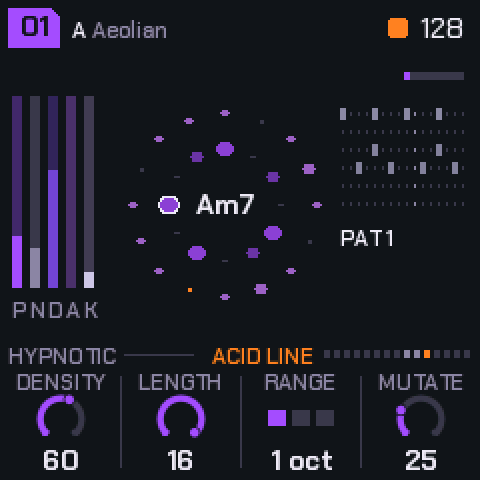
What moves by itself. The chord changes now and then (Drift sets how long it stays; EDIT moves it on). The pad's voices breathe on unequal cycles and take the new chord's notes as they breathe in. The drone follows the chord's root and glides. The acid line's notes are tied to the chord, so the riff transposes; Mutate rewrites steps each time round. Motion sets how far a slow tide swings between sparse and full, over a minute or two. Evolve makes the acid and the chords more restless.
Octaves
OCT− / OCT+ move an octave at a time, three down to three up. On the Pad, Drone or Acid pages (or their env and LFO pages) they move that voice alone; on any other page, Tempo among them, they move the whole song (pad, drone and acid together). The line above the knobs shows it when it isn't home: OCT+2 for the page's voice, SONG-1 for the song. The octaves are stored with the piece. Going down, each voice stops at the bottom of what you can hear (about C1), so −2 and −3 may sound alike.
6Pieces and storing
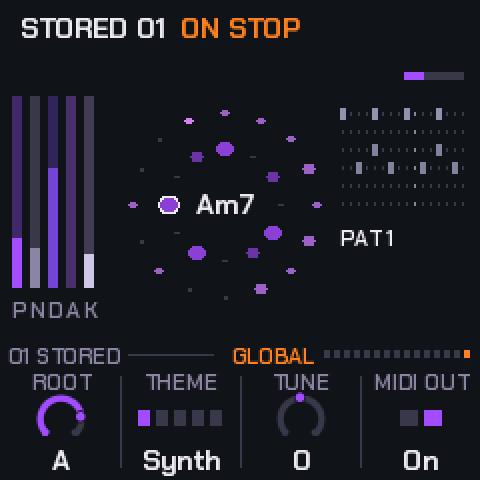
There are ten pieces, 01–10, on PRESETS. Each has its own settings, its own six drum patterns and its own drum sounds; patterns 1–6 run roughly intro, groove, build, peak, variation and a thinner tool. While the power is on, each piece keeps your changes as you left it.
Storing: go to Global and press SAVE. The piece is stored as it is: every page's values, the scale and mode, its style, its patterns and its drums' sounds. The line above the knobs says 01 SAVE: STORE while it has changes, then 01 STORED.
Factory: on Global, hold SAVE for 1.5 seconds (the screen says HOLD: FACTORY): the piece goes back to how it shipped and out of the store.
When it's written: writing to the FM-1's memory silences it for a moment, so a store made while playing is written as soon as you stop. A small dot by the tempo means a write is waiting.
Stop the music before you switch off, or a store still waiting is lost.
Power-on starts on a piece at random: as you stored it, or with small random changes to its factory settings if you never did. Theme, Tune and MIDI out are yours across all pieces and are kept too: they're written two seconds after you change them, even while the music plays.
| Piece | Character | BPM | Key |
|---|---|---|---|
| 01 | Hypnotic four on the floor | 128 | A Aeolian |
| 02 | Deep and dubby: rims, shakers | 124 | D Dorian |
| 03 | Pounding: rumble kick, claps | 132 | E Phrygian |
| 04 | Trance: offbeat opens, rolls | 138 | G Aeolian |
| 05 | Acid electro: cowbells, breaks | 130 | A Dorian |
| 06 | Dub techno: sparse, swung | 120 | F Pent minor |
| 07 | Minimal glitch: threes on fours | 134 | B Pent major |
| 08 | Rolling, tom-like percussion | 126 | Bb Mixolydian |
| 09 | Warehouse: hard, rides, rumble (Techno) | 136 | C Phrygian |
| 10 | Deep field: half time, breaks | 118 | Eb Aeolian |
7Styles
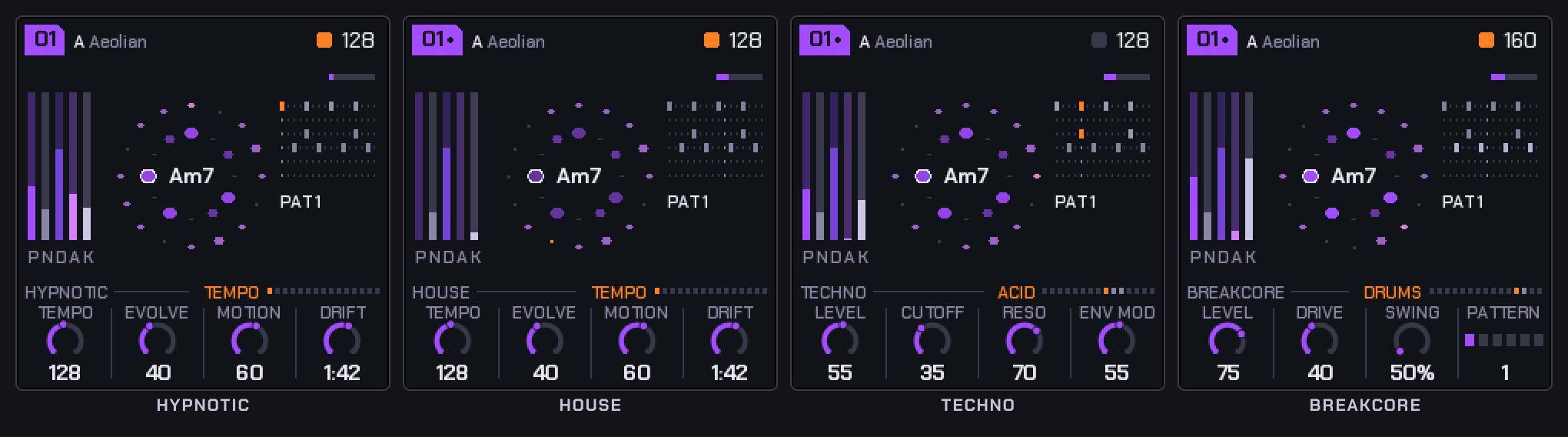
Hold SEL and turn ALGORITHM. A style reshapes every voice's sound and the feel: the drums' tones and decays, the swing, how the pad plays, the drone's grit, the acid's drive. Your patterns, levels and settings stay as they are. Switching style moves the tempo into the style's range; after that any tempo from 70 to 190 works. The style is stored with the piece.
| Style | BPM | What it does |
|---|---|---|
| Hypnotic | 110–145 | Deep kick, metallic 808-style hats, breathing pad, smooth drone. |
| House | 118–128 | Round kick, shuffle, wide clap, long open hats, congas. The pad stabs chords on the off-beats (Pad env Release sets their length; Evolve adds a few). Warm bass, more pump. |
| Techno | 128–138 | Hard, driven kick with a rumble tail, tight clap, metal hats, a bell perc. Dark pad, gritty drone. |
| Acid | 120–132 | Punchy 909-style kit with a cowbell and a little swing. The 303 driven and up front; pad and drone pulled back. |
| Breakcore | 160–180 | Distorted, crushed drums chopped live: ghost snares, extra kicks, 32nd rolls (Evolve: more). Dirty sub; the acid at half time. |
Links: the drums into the voices
The drum hits can be patched into the voices, like trigger cables on a modular. SEL + SEQ turns the links on and off without losing their amounts (+LINK shows on the line above the knobs while they're on); the Links page (SEQ, then SEQ again) sets each one, 0 being none. They're stored with the piece.
| Link | What it does |
|---|---|
| K>Drone | Each kick opens the drone's filter, falling back over the beat: a rolling bass that follows your kick pattern. The amount sets how far and how long. |
| S>Pad | Each snare or clap flashes the pad's filter open and swells it a little, so the pad answers the backbeat. |
| H>Acid | A hat landing on an acid note accents it: busier hats, a squelchier 303. |
| P>Clock | The acid line steps only when the perc lane hits, so the perc pattern in the sequencer becomes the acid's rhythm. In a breakdown or build, with the drums out, it runs free again. |
Muting a drum with FX silences it but its hits still drive the links: mute the perc and it's a pure clock for the acid.
8The sequencer
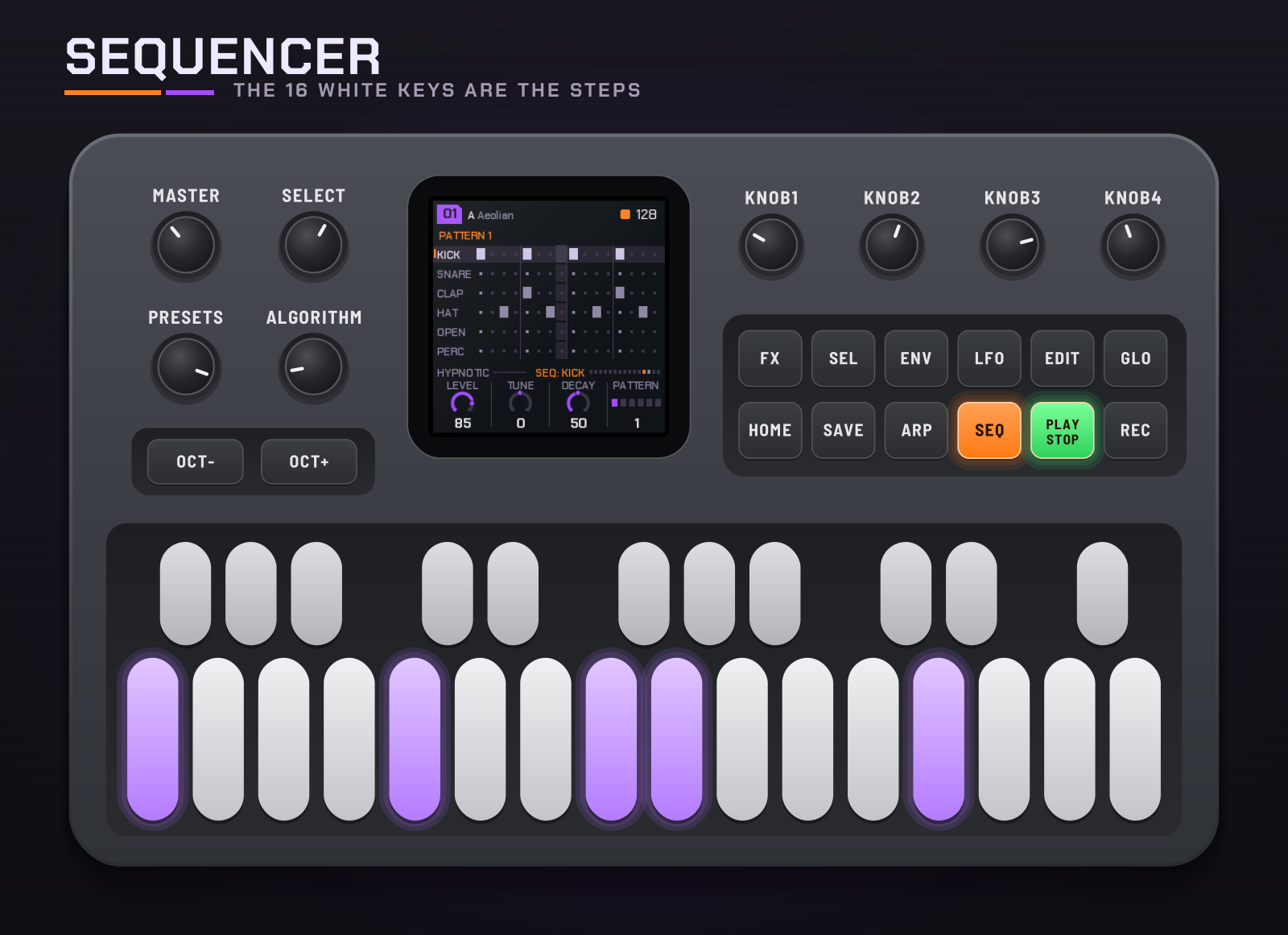
Hold SEQ to open it; tap SEQ to go back to the Drums page.
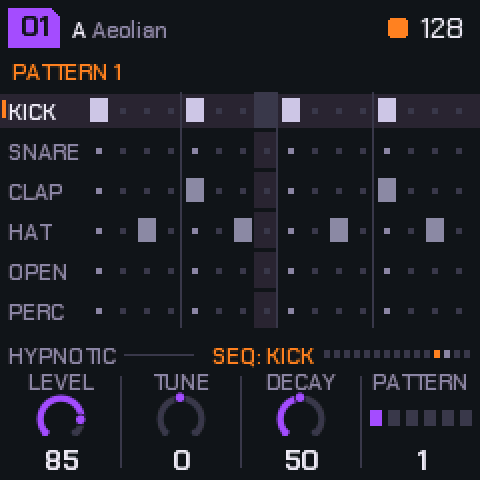
- Six lanes: kick, snare, clap, closed hat, open hat, perc. Sixteen steps.
- The sixteen white keys are the steps of the drum you're on. They light where it hits, and the light running across them is the playhead. Tap a key to turn its hit on or off.
- OCT− / OCT+ choose the drum.
- The knobs: the drum's Level, Tune (±1 octave) and Decay, and the Pattern you're editing (even before it plays).
- With SEL held: black keys 1–6 copy this pattern into pattern 1–6, OCT− clears this drum's lane, OCT+ puts back the piece's own lane, white keys 1–6 choose the pattern to edit.
9Effects
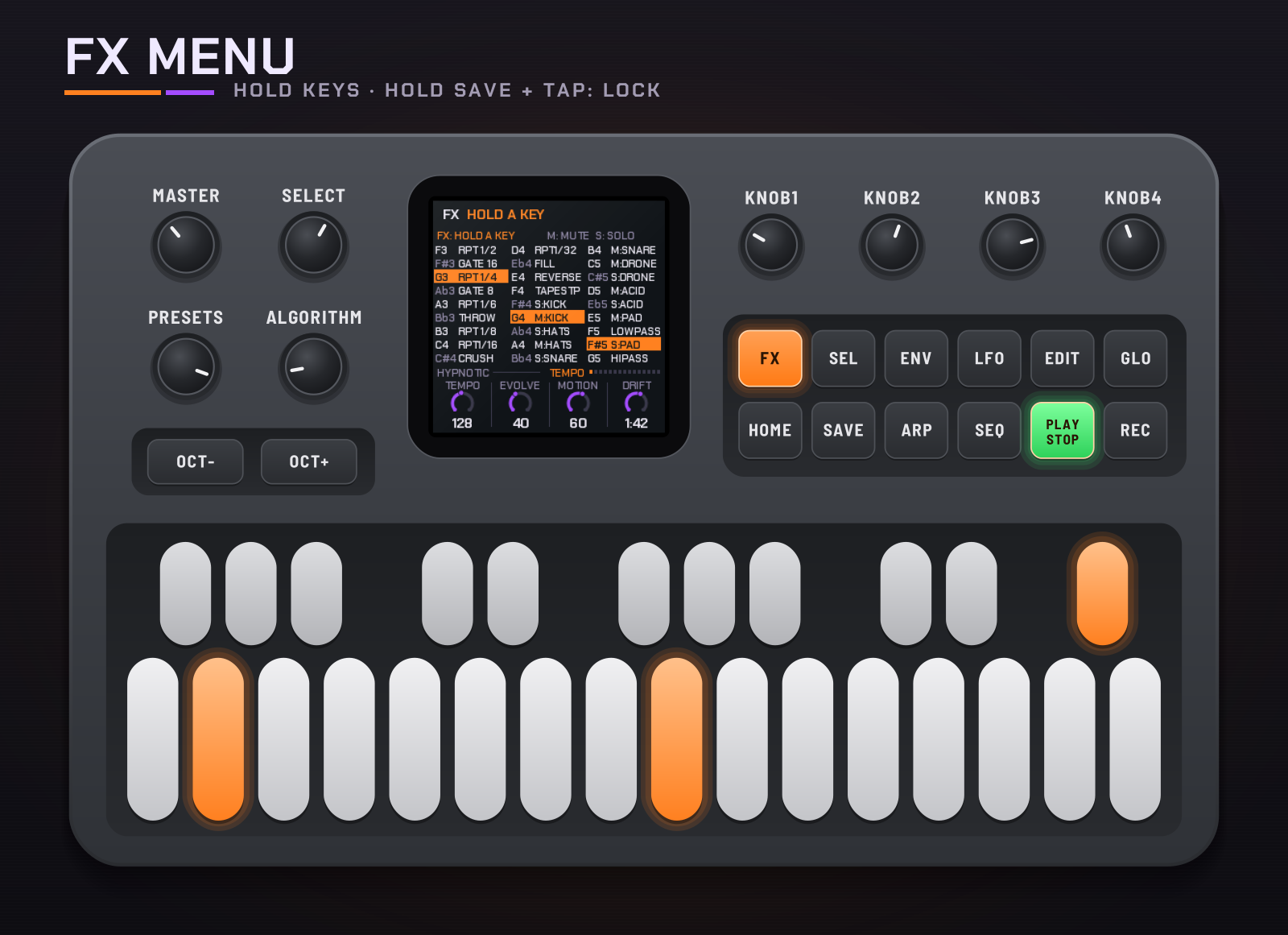
Press FX to open the menu; press it again to close it. While it's open, every key is an effect, playing while you hold it.
Locking: hold SAVE for lock mode. Each key you tap locks its effect on (it turns purple), one at a time or several together; tap a locked one again to unlock it. Keys already held when SAVE goes down lock too. Let go of SAVE and the locks stay while you play other effects over them. To turn one off, just tap its key (no SAVE needed): the others stay locked. Closing FX lets them all go. Tapping SAVE alone in FX is still the breakdown.
For example: FX, then hold SAVE, tap Gate 1/8, tap Crush, let go of SAVE: both stay on.
| Keys | Notes | Effect |
|---|---|---|
| White 1–6 | F3 G3 A3 B3 C4 D4 | Beat repeat 1/2, 1/4, 1/6, 1/8, 1/16, 1/32, from the next sixteenth (the shortest held wins) |
| White 7–8 | E4, F4 | Reverse, tape stop |
| White 9–14 | G4 A4 B4 C5 D5 E5 | Mute kick, hats, snare (with clap and perc), drone, acid, pad (with noise) |
| White 15–16 | F5, G5 | Low-pass, high-pass, closing in |
| Black 1–5 | F#3 Ab3 Bb3 C#4 Eb4 | Gate 1/16, gate 1/8, echo throw, crush, drum fill |
| Black 6–11 | F#4 Ab4 Bb4 C#5 Eb5 F#5 | Solo kick, hats, snare, drone, acid, pad |
Beat repeat and reverse play back the last moment of the mix (just under a second); a 1/2 repeat that doesn't fit at slower tempos plays as a 1/4.
10Performing
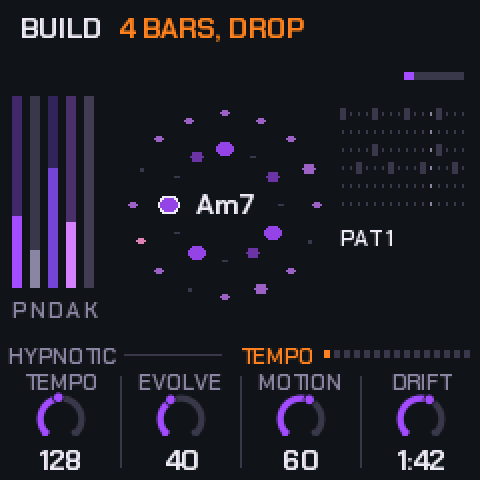
- Breakdown: tap SAVE. The drums drop out on the next bar, the drone closes and the pad rises, for as long as you leave it.
- Build: tap SAVE again. A four-bar snare roll with the drone opening, then the drop.
- Drop: hold SAVE. Straight back in on the next bar. SAVE lights during a breakdown or build and blinks while one waits for the bar.
- Freeze: REC. The chord holds and the reverb rings on; press again to let it move.
- Next chord: EDIT. Moves on at the next bar.
- The scale: the keys. Each adds or removes its note; the root stays. ALGORITHM picks a mode.
- Patterns. Drums page, knob d, or SEL + white keys 1–6. A change waits for the bar, so turning past patterns plays none of them.
There's no song saving: record the audio (or MIDI out) into your DAW and keep the takes you like.
11Shift
Hold SEL and:
| With | Does |
|---|---|
| White keys 1–6 | Pattern 1–6, on the bar. The keys light the one chosen; the one still playing blinks. |
| PRESETS | The next or previous piece, on the next bar ("PIECE 03 NEXT BAR" until it comes). |
| ALGORITHM | The piece's style. |
| SEQ | The links on and off. |
| GLO | Remote: the FM-1 plays the emulator (see 13). |
| Black keys 1–6 (sequencer) | Copy the pattern you're editing into pattern 1–6. |
| OCT− (sequencer) | Clear this drum's lane. |
| OCT+ (sequencer) | This drum's lane back to the piece's own. |
Keys pressed while SEL is held are never notes or effects.
12Themes and MIDI
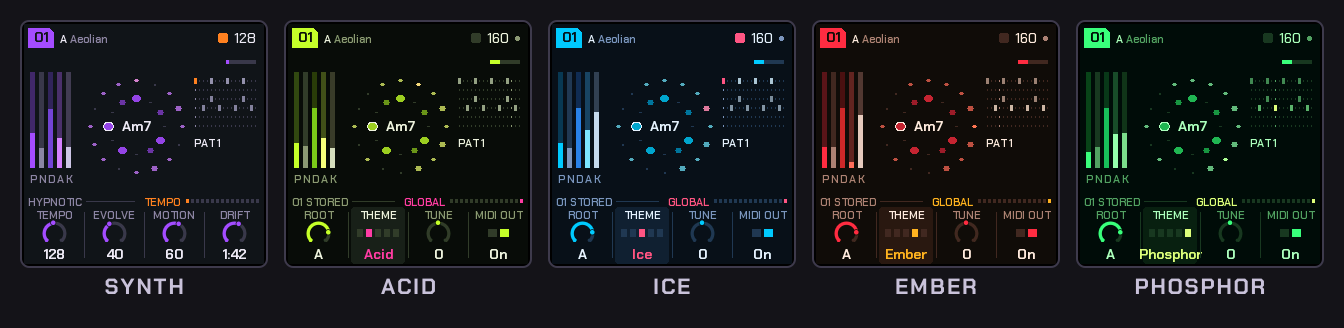
Global (GLO): Root, Theme (Synth, Acid, Ice, Ember, Phosphor), Tune (±50 cents) and MIDI out.
MIDI out (USB): the pad's notes on channel 1, the drone on 3, the acid on 4, the drums on 10 (General MIDI notes), and MIDI clock with start and stop.
MIDI in: channel 1 notes add or remove their note from the scale; clock and start / stop drive the tempo (EXT shows in place of the tempo).
13The emulator
The emulator runs the firmware itself in the browser. Drag a knob up or down, or scroll over it. Click buttons and keys; Shift-click (or right-click) a button to hold it down, click again to let go: that's how to hold SEQ, SAVE, SEL or HOME. New start powers it off and on (stored pieces stay, in that browser); Forget stored clears them.
| Key | Does |
|---|---|
| Space | PLAY |
| Enter | REC |
| Esc | HOME |
| V / L / P | ENV / LFO / ARP |
| M | SEQ (hold: the sequencer) |
| O / C / N | GLO / EDIT / SEL |
| ` | FX |
| B | SAVE |
| Z / X | OCT− / OCT+ |
| Up / Down | SELECT |
| Q–I, A–K | White keys 1–8, 9–16 |
| 1–0, - | Black keys 1–11 |
Playing it from the FM-1 (remote)
Plug the FM-1 in by USB, open the emulator in Chrome, Edge or Firefox, switch it on and press Connect MIDI (allow MIDI when the browser asks). Then, on the FM-1, hold SEL and press GLO: the screen says REMOTE, the FM-1 stops and goes quiet, and its whole panel plays the emulator: every button, key and knob, MASTER too. The emulator's lights come back to the FM-1's buttons and keys, so the panel reads as it always does; the emulator's screen is the one to watch. The FM-1 shows PLAYING THE BROWSER while the emulator answers and WAITING FOR THE BROWSER when it doesn't. SEL + GLO again gives the FM-1 back, stopped (PLAY starts it).
How it talks, for the curious: USB MIDI channel 16. Keys are notes 48–74, buttons CC 102–115 (127 down, 0 up), the knobs CC 85–91 (64 ± the detents), MASTER CC 7, and CC 116 is a hello each second. The emulator sends its lights back the same way, with CC 117 each second.
Any other controller (MIDI learn)
With M-VAVE's own firmware on the FM-1, or any MIDI keyboard or controller, the keys play the emulator's keys as soon as it's connected (by pitch, F3 to G5; notes outside fold into that range). For everything else, press MIDI learn, click a control on the emulator (it's outlined), then press or move the one you want on your controller. Learn as many as you like and press Done learning. Buttons and keys take a note or a CC; knobs take a CC, absolute (a knob or fader) or relative (an endless encoder: pick which in the list). The list is kept in that browser; Forget learned clears it.
14Troubleshooting
- No sound: check MASTER, and that PLAY is lit. A piece's layer levels can be at 0: each voice's page has its level on KNOB 1.
- The installer doesn't find the FM-1: use Chrome or Edge, a USB data cable (not charge-only), and close any DAW holding its MIDI port.
- An install was cut off: run it again; the FM-1 stays in update mode until it finishes.
- A stored piece came back as it was before: it was stored while playing and the power went off before the music stopped.
- The emulator doesn't see the FM-1: close any DAW holding its MIDI port, and use Chrome, Edge or Firefox (Safari has no Web MIDI). The FM-1 must be in remote (SEL + GLO) for its panel to play the emulator.
- Crackles or dropouts: please report the piece, style and tempo (a bug report on GitHub, or the board).
15Credits
HYP-1 is a RedtailWorks project (videos on YouTube), a fork of AMB-1 by Charles Vestal. The platform (USB, update loader, storage, installer) is Felucca by Leo Kuroshita (@kurogedelic), Hügelton Instruments. Screen font: Chakra Petch (SIL OFL). Licence: GPL-3.0.
HYP-1 is free. If it's found a place in your music, you can support it on Ko-fi.
M-VAVE and FM-1 are trademarks of their owners; HYP-1 is not affiliated with M-VAVE.