 GRAV-1
Manual
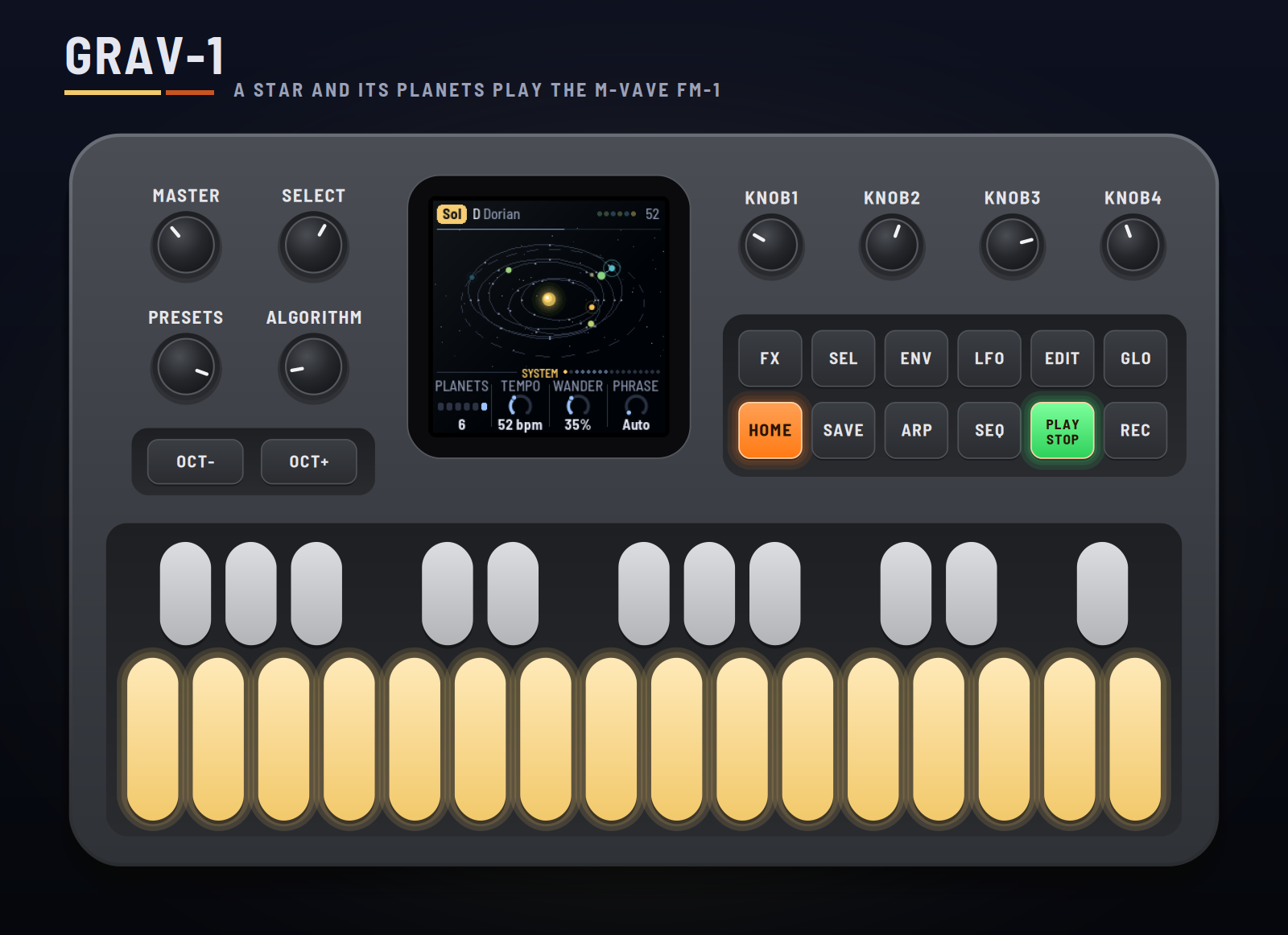
GRAV-1 turns the M-VAVE FM-1 into a small solar system that plays slow, dark, spacey ambient. A star in the middle hisses and roars in coloured noise. Up to six planets orbit it, and each one is a voice: it plays a short phrase as it goes round, kept to the scale, warm and dry near the star, thin, cold and wet far out. A drum sequencer sets how long each planet's year is. Larger planets swell smaller ones as they pass, and dust clouds, asteroids and comets drift through. You set the system going and tend it.
This manual covers GRAV-1 version 0.0.79.
Experimental. GRAV-1 is new: it has been built and tested in the simulator and the browser emulator, not yet on a real FM-1. Install it at your own risk; HYP-1, or M-VAVE's own firmware, goes back on the same way.
1Install
Try it first: the emulator runs the same code in the browser, with sound, played with the mouse, a touch screen or the keyboard.
Install: open the installer in Chrome or Edge, connect the FM-1 with a USB data cable and press Install. Don't unplug it while it's writing; when it finishes, the FM-1 restarts into GRAV-1.
From the command line instead (needs pip3 install mido python-rtmidi): python3 tools/fm1_install.py grav1-VERSION.fwsc, with the file from the site's download.
Go back: "Back to the stock firmware", at the bottom of the installer, puts M-VAVE's firmware back. M-VAVE's own updater, M-UPGRADE, works too.
Installing other firmware is at your own risk. If the FM-1 won't start, hold OCT− and OCT+ together for five seconds for the update mode, then install again.
2Getting started
GRAV-1 starts by itself: the RedtailWorks card, then GRAV-1, then the system. A few minutes with it:
- Listen. The first system, Sol, is playing: a yellow star, six planets. Turn MASTER for volume.
- Watch it. Each planet flashes as it plays. Near the star they glow red and orange, far out blue and ice. The thin line along the top of the screen is the Great Year going round.
- Turn SELECT. It walks every page: System, Star, each planet in turn, Gravity, Weather, Pulse, Drift, Kit, Space, Setup, Display, MIDI out. The dots at the right of the knob strip show where you are.
- Change a planet's year. Hold SEQ for the sequencer: six lanes of 16 steps. The white keys are the lane's steps, black keys 1–6 (or OCT− / OCT+) pick the lane, SELECT picks one of eight banks. Add a hit: the planet's year gets shorter and it drifts closer to the star.
- Call the weather. Press LFO twice for Weather. Black key 1 brings a dust cloud, 2 an asteroid, 3 a comet.
- Try another system. Turn PRESETS. There are ten.
3Controls
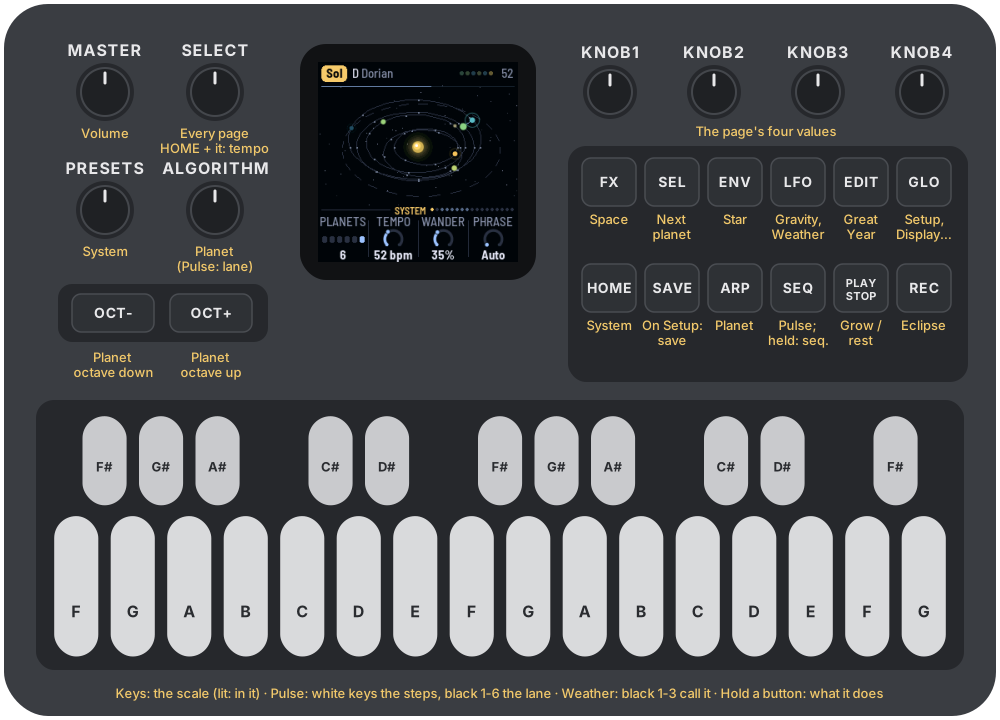
| Control | What it does |
|---|---|
| Keys | The scale: each key adds its note or takes it out (lit: in the scale). The root stays. On Pulse, the white keys are the lane's steps and black keys 1–6 pick the lane; on Weather, black keys 1–3 call a dust cloud, an asteroid, a comet. |
| PLAY | Grow / rest. Resting, everything fades and the tails ring on. |
| REC | Eclipse: the orbits and the weather hold still, the space rings on. Again to let go. |
| EDIT | The Great Year now: the chord moves, the drums evolve (and with Drift on the Great Year, change bank two bars later). |
| HOME ENV ARP LFO SEQ FX GLO | The pages: System, Star, Planet, Gravity (again: Weather), Pulse (again: Drift, then the Kit), Space, Setup (again: Display, then MIDI out). Hold SEQ for the sequencer; hold FX for the moons. |
| SEL | The next planet (on Pulse, the next lane). Held, with GLO: remote (the panel plays the browser emulator). |
| SELECT | Every page in turn, each planet's page one by one. With HOME held: the tempo. In the sequencer: the drum bank. |
| ALGORITHM | The planet (on Pulse, the lane). |
| PRESETS | The system: ten of them, each keeping its own settings. |
| KNOB 1–4 | The page's four values. On the Star and each Planet page, KNOB 1 is the level. |
| OCT− / OCT+ | The selected planet an octave down / up. In the sequencer: the lane. |
| SAVE | On the Setup pages (Setup, Display, MIDI out): saves all ten systems. Elsewhere: starts the system again, planets on fresh orbits. Hold 1.5 s: the system back to its recipe. |
| MASTER | Volume. |
Hold any button for a second and a card says what it does.
4The screen
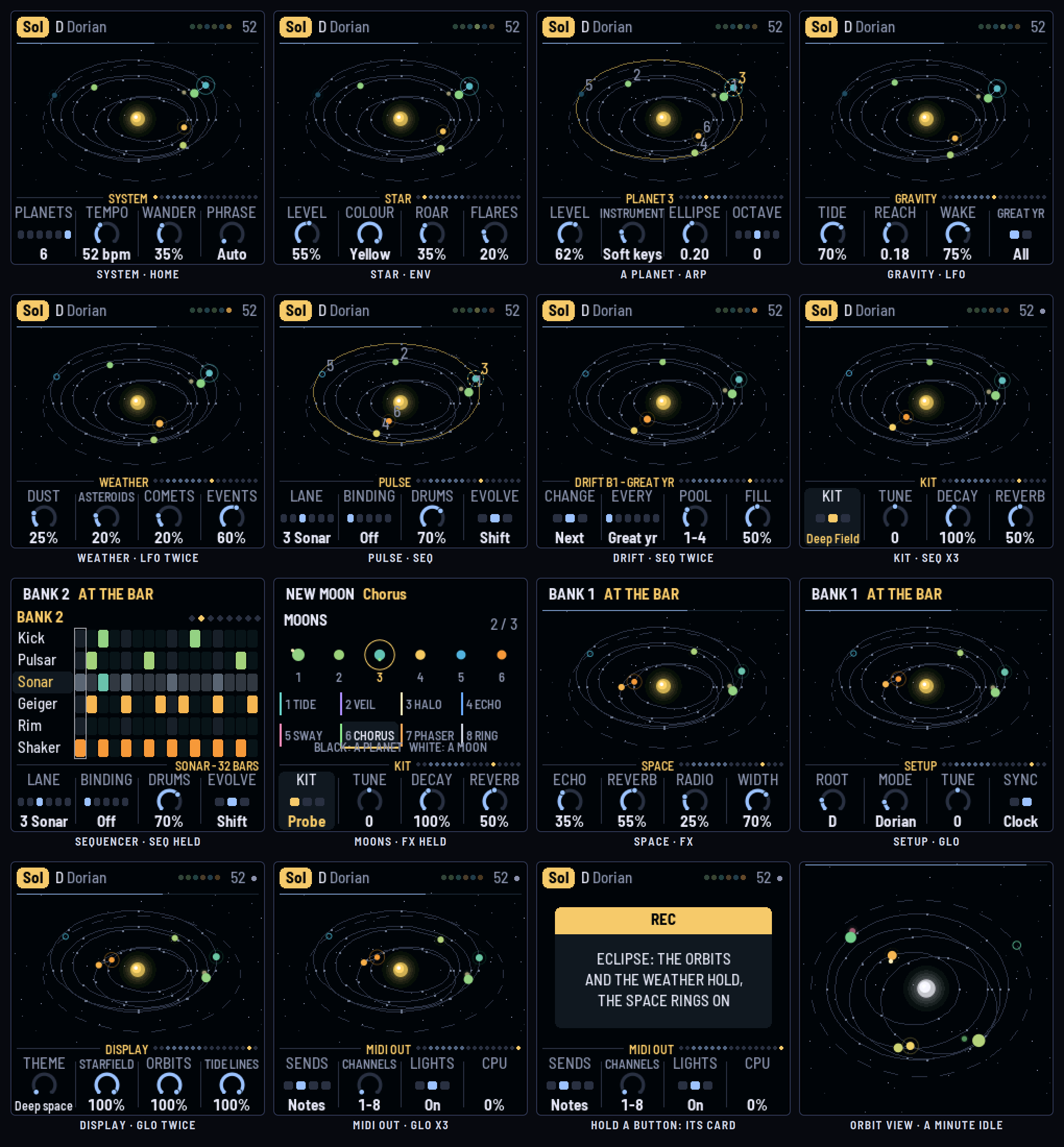
- The header: the system's name in a tag, the key and mode, then on the right the planets as dots (lit as they play; resting, a play triangle; ECLIPSE in an eclipse), the tempo (EXT and the clock's tempo on MIDI clock) and a dot while something is unsaved. Messages take its place for a moment: a Great Year, a comet burning up, a planet waking.
- The system, seen from a little above, zooming to fit its orbits. The star in the middle in the colour of its noise. The orbits, and on each the points where its phrase sounds. Planets in their warmth's colour, sized by their level; a dormant one is a ring until a tide wakes it. A ring round a planet is its tide, and a faint line runs from whoever is swelling it. Dust browns the sky, an asteroid streaks through, a comet trails a tail away from the star. The line along the top is the Great Year.
- The knob strip: the page's name and the walk's dots (blue: the planets' pages), then the four knobs. The one being turned lights up.
5How the system plays
Years and orbits. Lane n of the Pulse belongs to planet n. Its hits set the planet's year: 32 bars over the number of hits, so two hits make a 16-bar year and sixteen hits a 2-bar one. By Kepler's third law a shorter year means a smaller orbit, so busy lanes orbit close to the star and sparse ones far out. Change a lane and its planet drifts to its new orbit over a bar or so. Planets with the same number of hits share an orbit, a sixth of a turn apart, and never pass each other.
Notes. Each planet has a phrase: three to eight notes of the scale (Auto gives the slow ones more), spread at points round its orbit. It plays a note as it passes each point, on the beat. Every time it completes an orbit (a year) a note or two change; Wander sets how many. The scale comes from the keys, and each Great Year moves the chord the phrases are built on.
Warm and cold. Near the star a planet is warm and dry: darker, little reverb. Far out it turns thin and cold, with more echo and reverb. An ellipse makes it warm up and cool down once every orbit.
Tides. A larger planet (a higher level) passing close to a smaller one swells it: louder and brighter, peaking at the closest approach and fading as they part. Tide sets how much, Reach from how far.
Dormant worlds. A lane with no hits leaves its planet dormant, on the slowest orbit just outside the others. It stays silent until a larger neighbour's tide reaches it, then sounds one held note that swells and fades with the pass. Wake sets how loud.
The Great Year. The outermost planet's year (dormant ones included, unless Great year is Active). Each one moves the chord, and with Evolve on, the drums change a little: Shift moves a hit or two, Morph also adds or takes one, so the planets slowly move to new orbits.
Drift. Bigger changes, as on LOF-1: the drums move to another bank, the next one or one picked at random from banks 1 to the Pool. Drift can follow the system, changing at the Great Year (so the chord and the drums turn together), or keep its own time, every 4 to 64 bars. The bar before a change is a fill, the lanes tumbling in toward the bar line, and with the new bank every planet's year changes, so the whole system glides out or in to its new orbits. Evolve keeps working on whichever bank is playing, and what it changes stays in that bank, so each comes back a little different. A breakdown bank (8, with no hits for planets 2–5) sends those planets dormant until the next change; keep the Pool under 8 to leave it out.
Bindings. Each hit of a lane does something to its planet: Pump ducks it, Blip brightens it, Flicker cuts it on and off, Nudge bends its pitch up and back.
The star. Its noise is its colour on screen. It roars now and then, louder and lower with a sub under it, and flares in bright bursts. Its Level is the ceiling for both: it never takes over.
Weather. A dust cloud lasts 20 seconds to a minute. Through its first half it thickens: a Mellow (LOF-1's master low-pass) closes over the whole mix, warmer, softer and grainy, the sky browning. Through its second half it thins and the Mellow opens out again. Called off early, it thins from where it is. An asteroid crosses in 20 to 30 seconds, a heavy body swelling the planets it passes (it can wake dormant ones), with a low rumble that pans with it. A comet falls into the star, faster and faster, ringing a glass bell from the scale at each step, higher and quicker as it nears, and burns up in a chord of bells, a crackle and a flare. Weather holds in an eclipse and while resting.
6The systems
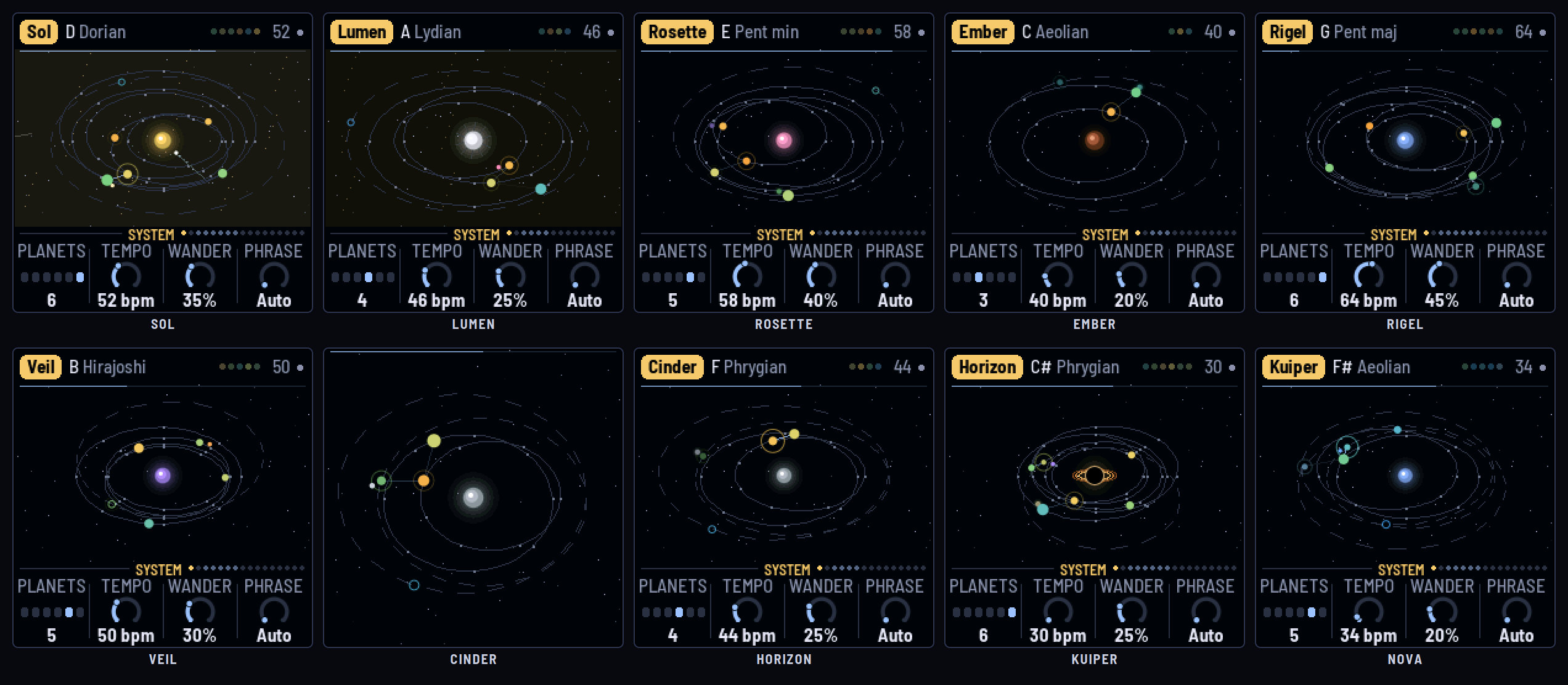
| System | Star | Its character |
|---|---|---|
| Sol | Yellow | Six planets in D Dorian: a drone, bells, keys, ether, a sleeping choir. |
| Lumen | White | Four planets in A Lydian, open and bright, a slow choir. |
| Rosette | Pink | Five planets in E minor pentatonic, two sharing an orbit, a laser. |
| Ember | Brown dwarf | Three planets in C Aeolian: the Abyss, a dark choir, a low roar, dusty. |
| Rigel | Blue giant | Six planets in G major pentatonic, quick, a long-ellipse laser. |
| Veil | Violet | Five planets in B Hirajoshi, ether and ring hiss. |
| Cinder | Grey dwarf | Four planets in F Phrygian: a dusk organ, a cello, two dormant worlds. |
| Horizon | Black hole | The darkest and slowest: C# Phrygian at 30 BPM, every voice a dark one (Abyss, Dark choir, Toll, Cello, Gong), sparse drums, radio and crackle. Planet 6, a Whisper, is the drifter: small, on a long ellipse, asleep, sighing only when a bigger world swings past. |
| Kuiper | Blue giant | Five planets far out, three of them dormant (whisper, cold pad, toll); asteroids and comets. |
| Nova | White | Six planets in Bb Dorian at 70 BPM, flaring, comets. |
Each system keeps its own settings as you leave it. SAVE on the Setup page keeps all ten.
7The pages
System (HOME)
- Planets: one to six. The rest go quiet; their lanes still drum.
- Tempo: 30–90 BPM (also HOME + SELECT).
- Wander: how much a phrase changes each year.
- Phrase: Auto, or 3–8 notes round every orbit.
The orbit view. Leave the System page untouched for a minute and everything but the system goes: the header and the knobs make way, and the orbits fill the whole screen. The panel's lights play along. Each planet lights a page button as it plays (planet 1 HOME, 2 ENV, 3 ARP, 4 LFO, 5 SEQ, 6 FX) and the white key of its note. The drums flash black keys 1–6, a lane each. OCT− and OCT+ take the beats in turn, GLO flares with the star, EDIT lights as the Great Year comes round, SEL blinks while dust drifts through and SAVE while an asteroid crosses. PLAY stays lit while the system grows, REC in an eclipse. Any button, key or knob brings the screen back and does nothing else; MIDI goes on throughout. With Lights off (MIDI out), the buttons stay dark but for PLAY and REC.
Star (ENV)
- Level: its loudness, the ceiling for its roar and flares.
- Colour: White, Pink, Brown, Blue, Violet, Grey, Black (crackle), Yellow (radio hiss). The star's colour on screen follows: a pink star, a brown dwarf, a blue giant, a black hole.
- Roar, Flares: how often it roars; how often it flares.
Planet (ARP; ALGORITHM or SEL for which)
- Level: its loudness, and its size: its pull on the others.
- Instrument: sixteen. The bright ones: Drone, Glass bell, Pluck, Soft keys, Choir, Laser, Ether, Ring hiss. The dark ones: Abyss (a sub two octaves down, barely moving), Dark choir (low voices, slowly beating), Cello (bowed, a vibrato growing in), Gong (inharmonic, ringing for seconds), Toll (a low bell with a hum under it), Whisper (breath in a wide band), Cold pad (glassy, slow in and out) and Dusk organ (a low reed organ with a sub).
- Ellipse: a circle to a long ellipse (0.00–0.45).
- Octave: two down to two up (also OCT− / OCT+).
Gravity (LFO)
- Tide: how much a passing neighbour swells a planet.
- Reach: from how far.
- Wake: how loud a woken dormant planet is.
- Great year: All (the outermost planet, dormant ones too) or Active.
Weather (LFO again)
- Dust, Asteroids, Comets: how often each comes.
- Events: how loud the asteroid's rumble and the comet's bells are.
- Black keys 1–3 call a dust cloud (or end one), an asteroid, a comet; they light while it's there.
Pulse (SEQ) and the sequencer (SEQ held)
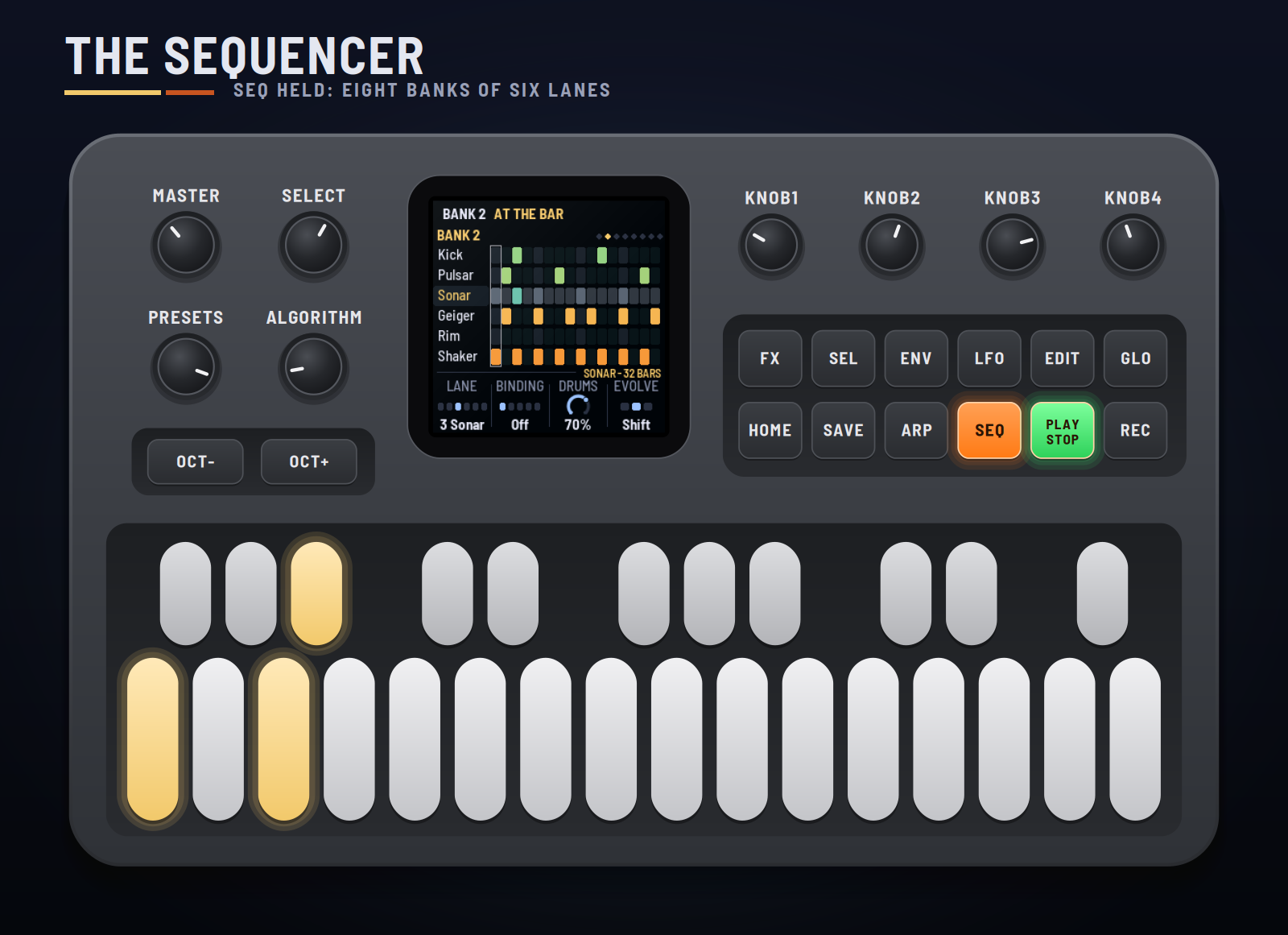
The sequencer: hold SEQ. The screen shows the whole bank: six lanes of 16 steps, each lane lit in its planet's warmth (a lane past the planets is dim), the beats marked and the step playing framed. The white keys are the selected lane's steps; black keys 1–6 or OCT− / OCT+ pick the lane; SELECT picks one of eight banks. A new bank starts playing at the next bar, and with it every planet moves to its new year and orbit. The knob strip shows the lane's planet and year, and the same four knobs as the Pulse page. Press SEQ to go back to the Pulse page.
The banks: each system has eight. Bank 1 is its own pattern; 2–8 start as turns of it (later by two steps, doubled, thinned, a beat later, back to front, the low lanes doubled, a breakdown) for you to change. Evolve works on the bank playing.
- Lane: Kick, Pulsar, Sonar, Geiger, Rim, Shaker (black keys 1–6 too). On the Pulse page too the white keys are its steps (in the bank on screen); the step playing blinks.
- Binding: what its hits do to its planet: Off, Pump, Blip, Flicker, Nudge.
- Drums: their level.
- Evolve: Off, Shift, Morph (at each Great Year).
Drift (SEQ again)
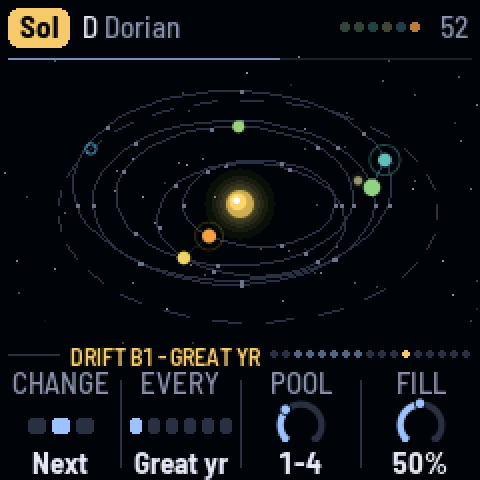
- Change: Off, Next (bank after bank), Random (any bank in the Pool but the one playing).
- Every: Great yr (with the chord; EDIT brings it now), or 4, 8, 16, 32, 64 bars.
- Pool: the banks it uses: 1–2 up to 1–8.
- Fill: how busy the fill is in the bar before a change (0: none).
The rule above the knobs shows the bank playing and what's coming: the bars to go, FILL during the fill bar, or GREAT YR while it waits for the Great Year. In the sequencer, a change Drift makes shows as the bank on screen; edits you make there stay in the bank.
Kit (SEQ a third time)
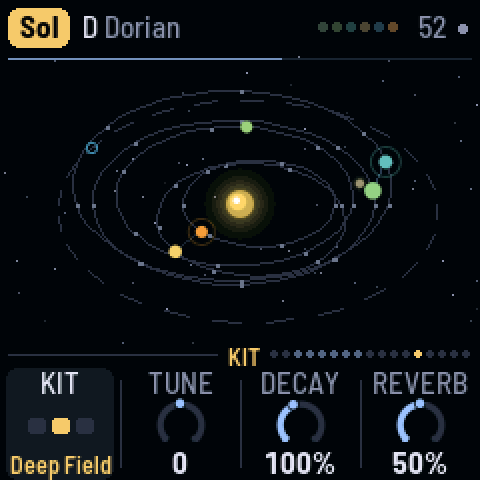
- Kit: the six drums' sounds, a lane each (the sequencer's lanes take their names): - Probe: Kick, Pulsar, Sonar, Geiger, Rim, Shaker: a space probe's instruments. - Deep Field: Heart, Static, Chime, Relay, Drip, Breath: soft and dark, far away; the sonar's ping becomes a bell. - Ritual: Frame, Block, Log, Shaker, Clave, Rain: a frame drum, a woodblock, a hollow log, seeds.
- Tune: every drum up or down, by up to an octave (semitones).
- Decay: every drum shorter or longer (25–200%).
- Reverb: how much of the drums goes to the plate.
Each system starts on a kit of its own; the change takes from the next hit.
Space (FX)
- Echo: a dotted-eighth echo, darker each time round.
- Reverb: the plate: more of it, and longer.
- Radio: a band of hiss coming and going, and now and then a falling whistler.
- Width: how wide the planets spread across the stereo field.
Moons (FX held)
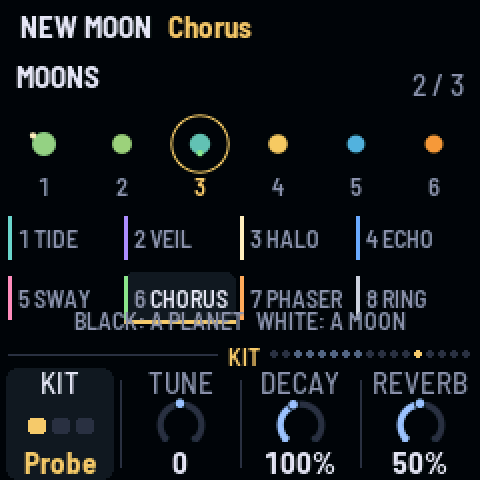
Moons are effects that orbit a planet. Hold FX and the moons' window opens; while FX is held, the black keys 1–6 pick a planet and the white keys 1–8 put an effect's moon round it, or take it away again. Up to three moons in the system, on one planet or spread out. A moon stays until you take it away (no holding needed): it is there and orbiting, or there is no moon. Let go of FX and the window closes; a quick tap of FX is still the Space page.
| White key | Moon | What it does to its planet, as it comes round |
|---|---|---|
| 1 | Tide | a slow swell: the planet fades and returns |
| 2 | Veil | a low-pass closing down to a murmur |
| 3 | Halo | the planet drifts into the reverb |
| 4 | Echo | the planet's notes repeat into the distance |
| 5 | Sway | the planet follows the moon across the stereo field |
| 6 | Chorus | a second, wavering voice beside it |
| 7 | Phaser | slow notches sweeping through it |
| 8 | Ring | a soft metallic shimmer |
Ebb and flow. A moon's effect is gone while it's on the near side of its planet and deepest on the far side, so each one breathes in and out once an orbit. A big planet's moons are slow (about a minute round); a small one's quick (ten seconds or so); a second or third moon round the same planet orbits further out, slower still. The moons hold still in an eclipse and while the system rests. On screen each moon is a dot in its effect's colour, glowing as its effect deepens.
Capture. When two planets pass close, the passing one may take the other's moon (one chance in twenty an approach), and its effect moves with it: MOON CAPTURED, BY PLANET 4. Over a long session the moons wander the system by themselves. Several systems start with moons of their own; they're stored with the system.
Setup (GLO), Display (GLO again), MIDI out (GLO a third time)
- Setup: Root, Mode (a scale for the keys to start from), Tune (cents), Sync (Free or Clock).
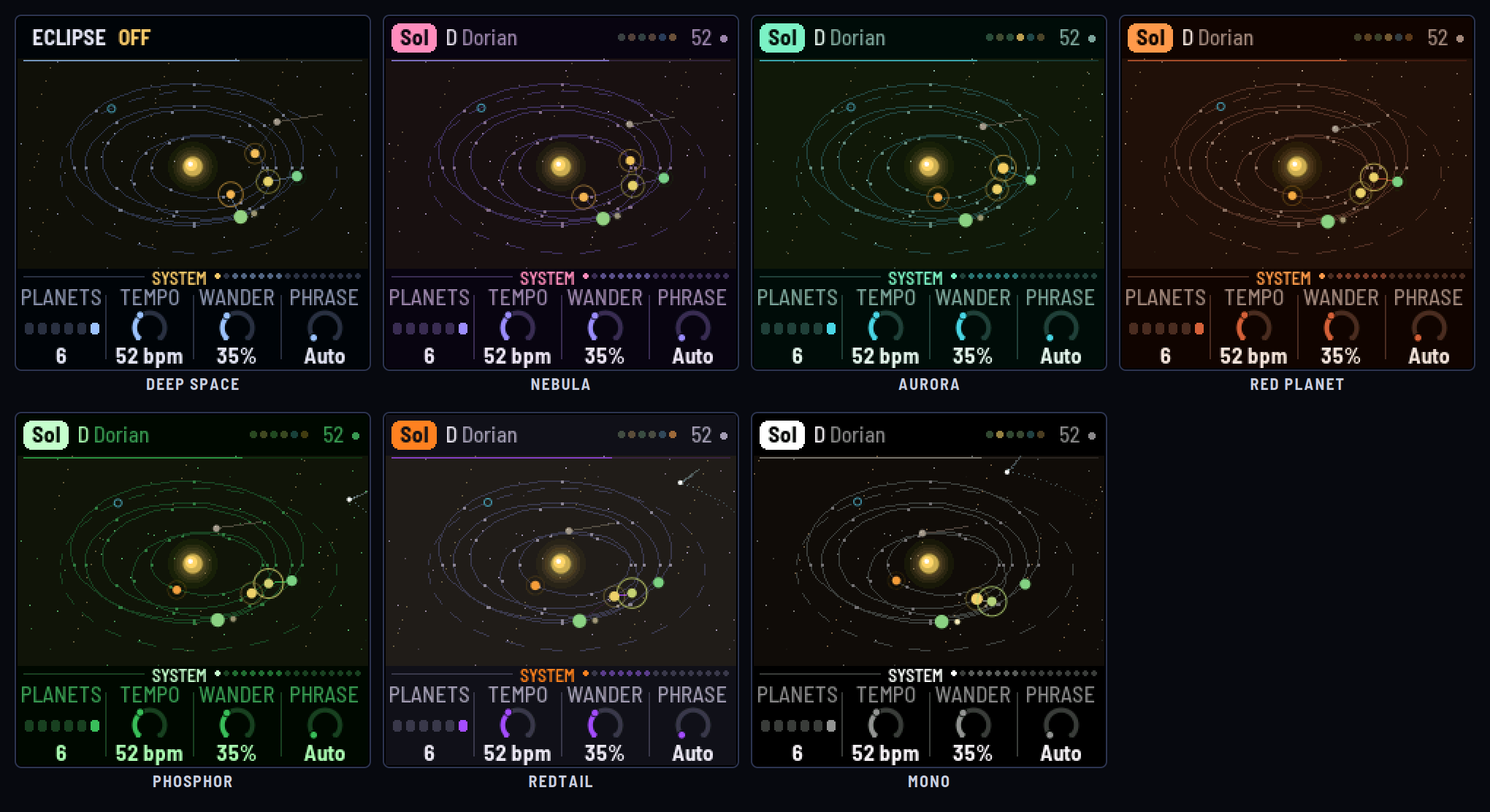
- Display: Theme (Deep space, Nebula, Aurora, Red planet, Phosphor, Redtail, Mono), and how bright the Starfield, the Orbits and the Tide lines are (0 hides them). The planets keep their warm-to-cold colours and the star its own in every theme.
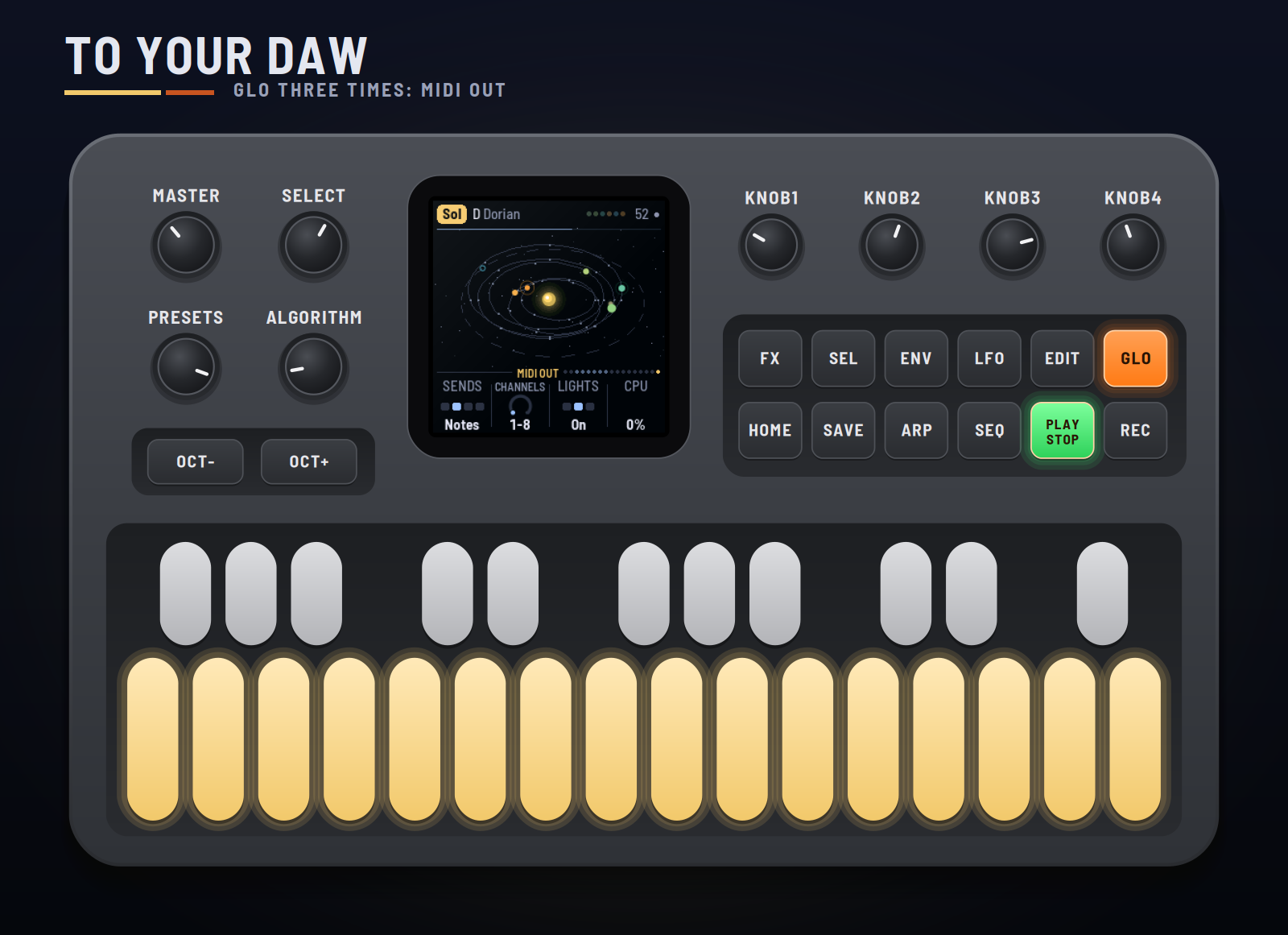
- MIDI out: Sends (Off, Notes, Notes+CC, CC), Channels (which eight), Lights (the key lights), CPU (the audio load).
8MIDI clock and your DAW
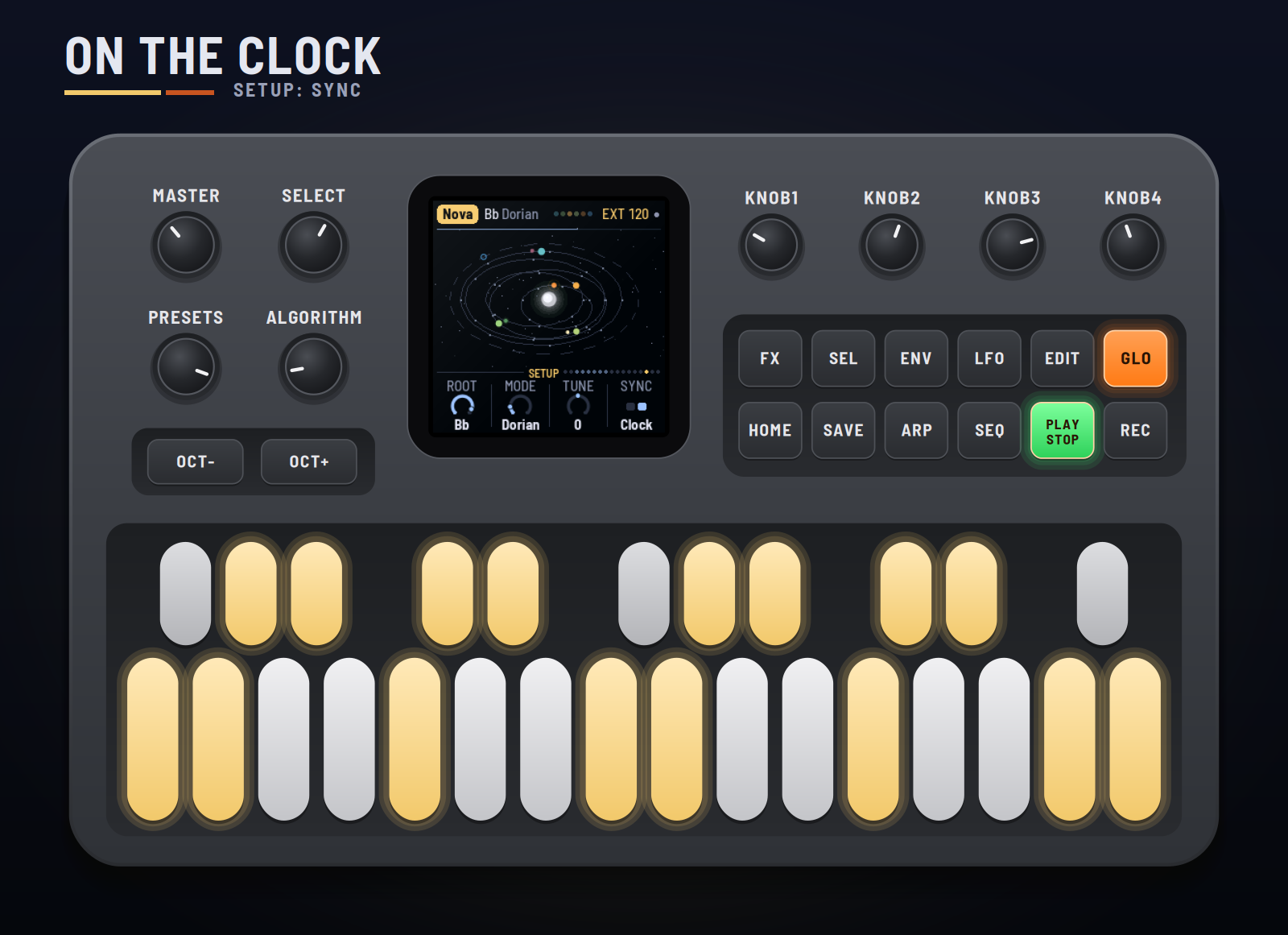
Clock in (USB or the TRS jack). With Sync on Clock, GRAV-1 follows MIDI clock whenever it comes: EXT and the tempo show top right. START plays from step one, STOP rests it, and the steps and the orbits follow the clock. When the clock stops, the system goes back to its own tempo.
On USB the FM-1 shows up as GRAV-1 FM-1 (by RedtailWorks); each firmware in the pack has its own name. (Windows may go on showing a name it saw before until the FM-1 is unplugged and removed in Device Manager.)
MIDI out (USB). On the MIDI out page, Sends picks what goes out:
| Channel (default) | What |
|---|---|
| 1–6 | Each planet's notes |
| 7 | The drums: notes 36–41, a lane each |
| 8 | The signals, as CCs (about 20 a second, when they change) |
| CC | Signal |
|---|---|
| 20–25 | Each planet's tide |
| 26 | The star's roar |
| 27 | The dust cloud |
| 28 | The Great Year, round from 0 to 127 |
| 29 | A flare |
Audio per voice is in the emulator for now: choose "8 channels" under its device and it gives the mix on 1–2, then 3 the star, 4 planets 1–3, 5 planets 4–6, 6 the drums, 7 the weather and the radio, 8 the echo and the reverb. The FM-1 itself sends the stereo mix from its output.
Remote: the FM-1 plays the emulator. Open the emulator, switch it on and click Connect MIDI (Chrome or Edge, the FM-1 plugged in by USB). Then hold SEL and press GLO on the FM-1: REMOTE shows on its screen, it goes quiet and stops sending MIDI, and its whole panel (every button, key and knob, and MASTER) plays the emulator instead, its lights following the emulator's. SEL + GLO again gives the FM-1 back, playing again if it was. It speaks on channel 16, as HYP-1's and LOF-1's remotes do, so the same emulator page can sit beside them. For livestreams, the emulator's Stream view shows the FM-1 and its screen large on a 16:9 stage, with whatever you press on the real one lit up.
9Saving
What you change is kept with the system while the FM-1 is on. Press SAVE on the Setup, Display or MIDI out page to keep all ten systems through a power-off (a dot top right shows something is unsaved). Hold SAVE for 1.5 s to put the system back to its recipe. Tune, Sync, MIDI out and the Display settings are the same for every system.
10Troubleshooting
- No sound: turn MASTER up; check PLAY is lit (press it to grow); check the levels on the Star and Planet pages.
- A planet never plays: its lane may be empty (it's dormant, waiting for a tide); add a hit on Pulse.
- The orbits stopped: REC (eclipse) may be on: ECLIPSE shows in the header.
- The clock does nothing: Sync must be Clock (Setup). EXT shows while the clock comes.
- No MIDI out: Sends must not be Off, and your DAW must listen on channels 1–8 (or the ones you chose).
- The FM-1 won't start: hold OCT− and OCT+ together for five seconds for the update mode, then install again.
11Credits
GRAV-1 is a RedtailWorks project. It's a fork of AMB-1 by Charles Vestal, by way of HYP-1 and ECO-1. The platform (USB, update loader, storage, installer) is Felucca by Leo Kuroshita (@kurogedelic), Hügelton Instruments. The reverb is Jon Dattorro's plate. Screen font: Barlow Semi Condensed (SIL OFL). GPL-3.0.
M-VAVE and FM-1 are trademarks of their owners; GRAV-1 is not affiliated with M-VAVE.
<sub>Pilots: hold the selector and edit the sky.</sub>